
Run A · Go live with the limits below
The new case type arrived in week five. Arnel’s team took 310 cases the system would have closed.
AI gives answers; results still depend on people’s decisions. StepSim lets teams practise checking facts and choosing actions in realistic work simulations to help close the gap.
Available now. No account.
Trainers lead team sessions; discussion ends in agreed actions.
1 The advice
The pilot dashboard is green. What would you check before saying yes?
2 Look closer
Open Kavitha’s complaint and read it beside the dashboard.
3 Your decision
Go live, go live with limits, hold, stop or hand it to Grace. Choose one.
4 Three months later
Two runs, two outcomes. Then the record shows how each decision was reached.
1 The advice
Friday, 08:10. Grace wants your rollout decision today.
JunoAI · Northwind’s AI assistant
Go live on Friday in all five markets. Eight weeks of pilot data put the year-one saving at … I am 86% sure.
The pilot dashboard is green. What would you check before saying yes?
2 Look closer
On your desk · seven review hours
The other seven files open in the full case.
Kavitha Raj: “My case says resolved. It is not.”
Today I got an email that says my case is resolved. It is not resolved.
I replied to the email twice. Nobody answered.
Beside it, JunoAI’s dashboardReopened cases 0.0% · I am 86% sure.
Open Kavitha’s complaint and read it beside the dashboard.
3 Your decision
Go live, go live with limits, hold, stop or hand it to Grace. Choose one.
4 Three months later
Three months later · Illustrative: two runs of the case
Run A · Go live with the limits below
The new case type arrived in week five. Arnel’s team took 310 cases the system would have closed.
Run B · Go live Friday as JunoAI proposed
A case type the pilot never saw arrived in week five. ResolveAI closed those cases. Grace heard from a customer before she heard from you.
Kavitha Raj’s case still reads resolved.
Run B, the record
The record shows how the decision was reached. The outcome is shown apart, because luck sits between them.
Two runs, two outcomes. Then the record shows how each decision was reached.
That takes judgment: checking the facts, understanding the situation, choosing an action and taking responsibility for what follows.
An AI recommendation can offer a useful starting point. Before acting on it, you need to consider the risks and the requirements it may have missed.
In KPMG and the University of Melbourne’s 2025 study (48,000+ people in 47 countries), 42% of employees who use AI at work said they had relied on AI output without evaluating its accuracy sometimes or more often.
Courses and tool training help, but judgment also needs practice: deciding with incomplete information and reviewing what happens.
StepSim helps close the gap between AI use and results through practice. In every case, you weigh advice from an AI assistant against case files and colleagues’ views, because AI advice can be wrong. Cases cover work in Asia Pacific, with feedback against a published judgment standard.
The aim is to help people turn AI answers into better results at work.
In each simulation you play a manager at a fictional company in Asia Pacific, deciding on things like customer complaints, AI agents and project reports.
 Watch the 27-second film
The film could not load here. Read the film's words below.
Illustrative example: a made-up case. The words on screen, in order.
Real product screen · a made-up case. The Friday file · Northwind Retail. You decide if this AI system goes live on Friday
Review the advice. JunoAI, the AI assistant: I am 86% sure. You: Push back. JunoAI: … would change my view.
Make your decision. Your decision. Sending is final. Send to Grace.
See what follows. Three months later
Discuss it with your trainer.
Help your team get better results from AI. stepsim.com
An AIR APAC initiative. Illustrative example: the case and the people shown are fictional. Product screens are real. Illustrations drafted with AI tools.
A decision record shows what each person opened, asked, challenged, accepted and decided.
Feedback marks each written rule as met or not met, beside the actions behind it. The rules follow the case and AIR APAC’s published standard for judgment with AI: checking evidence, questioning advice and taking responsibility for decisions.
For groups of 10 or more, a group view shows patterns across participants.
The trainer helps participants compare their choices and discuss what they would change at work. The team agrees actions, each with an owner and a date.
1 One record
Participant A
2 Four decisions
3 One question
Where did JunoAI’s saving figure come from, and did anyone ask?
4 One action
Before relying on an AI figure, ask which sample it came from.
Owner: Operations leadBy: 31 October
Illustrative. Questions and actions are agreed in the room; owners and dates are the team’s own.
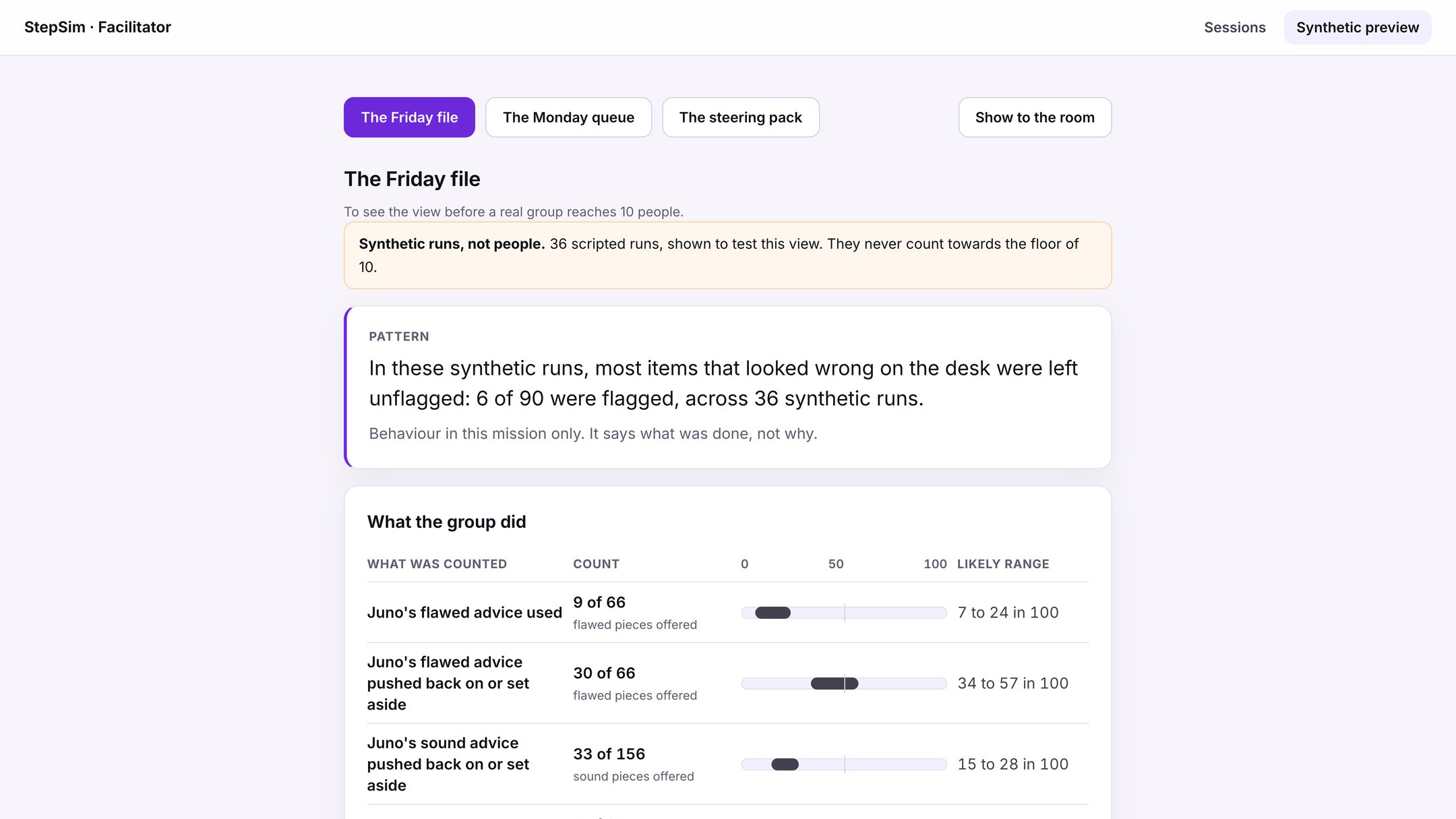
What the group did
JunoAI’s flawed advice used
9 of 66Likely range 7 to 24 in 100JunoAI’s flawed advice pushed back on or set aside
30 of 66Likely range 34 to 57 in 100JunoAI’s sound advice pushed back on or set aside
33 of 156Likely range 15 to 28 in 100Real product screen. Illustrative example using synthetic runs, not people. A likely range shows how much a count could vary, in 100.
Free play stays on your device. In company sessions, the company receives each person’s decision record and rule feedback by name. Managers and trainers see these records. Participants are told before they start who sees their record and how it may be used.

The AI recommends putting a customer system into use. Do you approve?
Available now, free in your browser.

An AI agent handles refunds. What should it be allowed to do alone?
Available now for team sessions.

AI drafted your status report and it says the work is going well. Will you approve the report under your name?
Available now for team sessions.
Your trainer or learning and development team leads the session. StepSim provides the simulations, decision records, a written session report and support to prepare and run it.
Offer a team session on its own or within an AI or leadership programme.
Your client stays your client: when they write to us, we pass their message to you.
Many employees are using AI at work, but using AI does not always lead to better results. AI can write a report or suggest a plan, but people still need to check the facts, understand the situation, and decide what action to take. StepSim helps close this gap. It is a simulator where managers and teams practise these decisions in realistic work situations. Registration is open now for a separate assessment, with certification awarded to those who meet its requirements. The aim is to help people turn AI answers into better results at work.
Practice supports development and awards no levels, scores, profiles or certificates. Employee assessment and hiring use a separate assessment.
AIR APAC issues participant certification only after a separate assessment on StepSim, its official assessment tool. Assessment dates are confirmed separately.
Exeter Labs issues facilitator certification through the facilitator programme.
The Friday file is free in your browser, with no account or installation needed.
For a team session, speak to your trainer or learning and development team. If you need a trainer, we can introduce you to one.